7. Weight file
Section: 7. Weight file | Biotope - Cumulative IMPacts of invasive ALien species (CIMPAL) version | LifeWatch ERIC Training Platform
-
The weight file is the key of the CIMPAL analysis. This matrix (provided as a csv file) assigns a value of impact for each taxon inside each biotope. It links a species impact to a given biotope using predefined weights (defined by the user’s choice of impact assessment framework 1 ). A species can impact multiple biotope categories with different impact weights. If available, the strength of evidence 2 of each specific species-biotope impact weight can be accounted for, which will allow to calculate an "uncertainty averse” 2 version of the CIMPAL index, otherwise a "precautionary" version is calculated.
The input must be a file with .csv extension (with TSV) in a matrix format (e.g., Fig. 9) with the first column listing the alien species names scientificName and the subsequent n columns’ headers (first row) being the n habitat names <habitatname>. These names must correspond to the names of each spatial layer uploaded in the next step (7 – Biotopes) and must be written in lower case. The cells in the matrix correspond to the value of the Magnitude of Impact (MoI):
- (column 1) scientificName (text): the scientific name of the alien species must match the names in the input file used in Alien Taxonomy Dataset Uploader (field scientificName)
- (row 1, column 2 to n+1) <habitatname> (text): the habitat names (lower case) must match spatial layers habitat names in input files Biotopes.zip (<habitatname>)
- (matrix cells) (integer): score of the Magnitude of Impact (MoI) of each species in each habitat, according to the scoring protocol adopted by the user (more info in e.g., Katsanevakis et al. 2016 1).
To upload the .csv file with your matrix, press the three vertical dots at the end of the first line on the expanded file list, and choose ‘Upload file’ (e.g., Fig. 7). After the upload is complete, you must select the file before advancing to the next step. Dummy testing data is also available (weight_wp.csv, shown in Fig. 9).
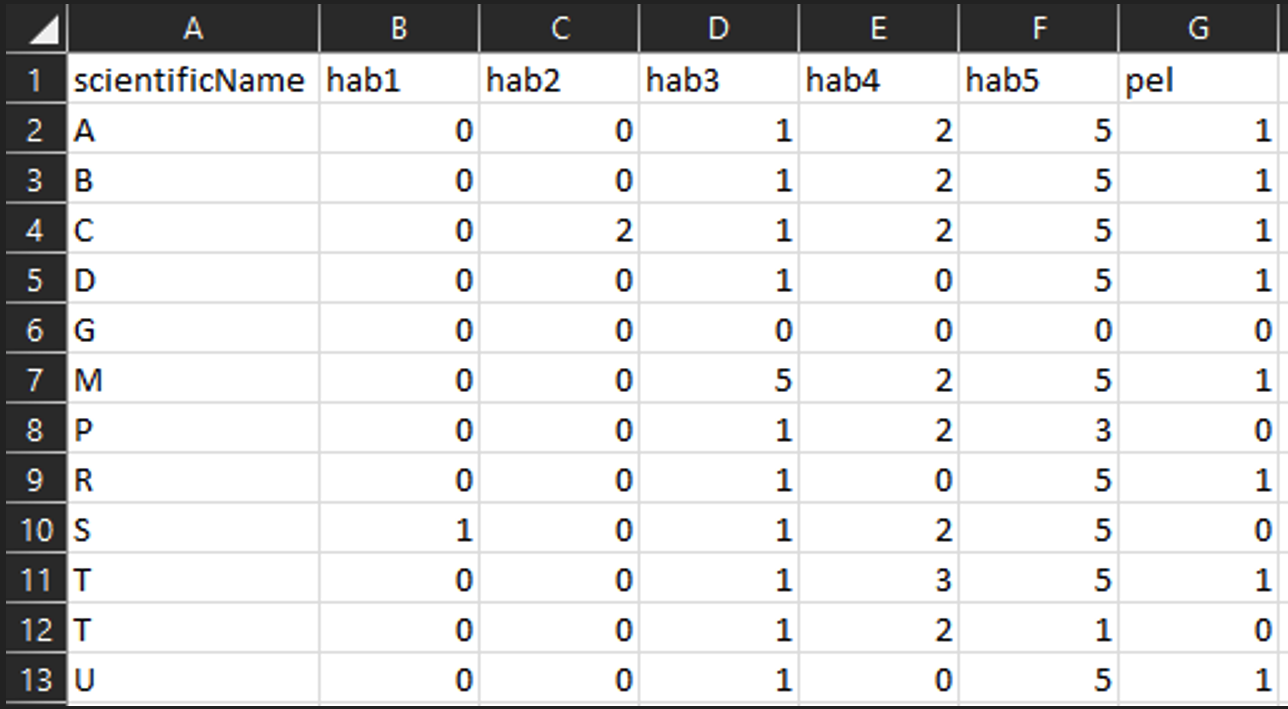
Fig. 9 Structure of a weight_wp.csv dummy file, as general example on how to present the CIMPAL weights for each species.
Note: Please run several workflows if you need different weights for the same taxa; to calculate different versions of the CIMPAL, the workflow needs to be re-run with a new weight matrix.
1https://neobiota.pensoft.net/article/31650/
2 Precautionary version of the CIMPAL index only considers the magnitude of the impact (MoI), while the alternative version, averse to uncertainty, includes a correction to the MoI based on the strength of evidence (SoE) associated with low evidence supporting impact magnitude characterization.