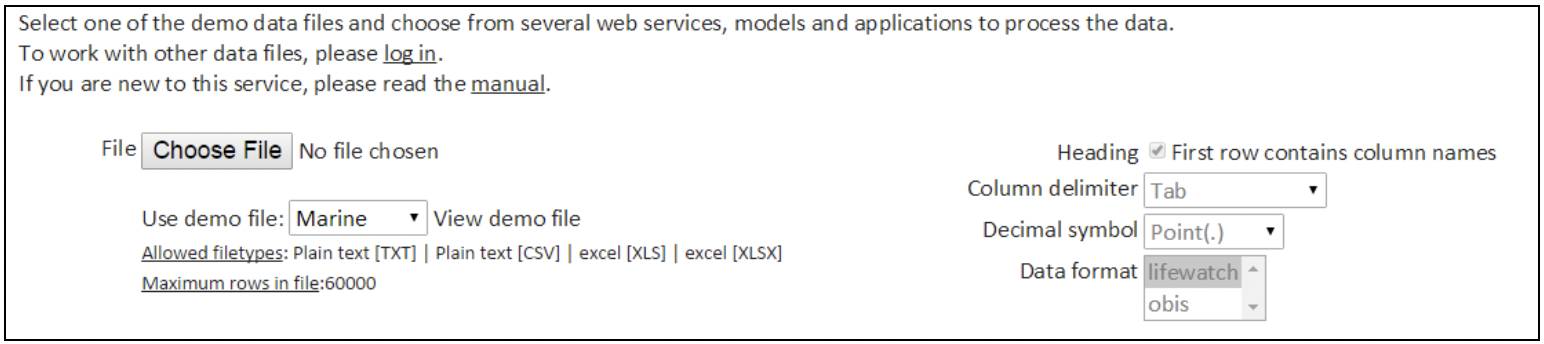
1. Upload your File
Section outline
-
Prepare your data file for upload. Allowed file types: Plain text [TXT], Plain text [CSV], Excel [XLS] and Excel [XLSX].
[Note: All web services (except one) require the uploaded data to be in the standard LifeWatch data format, based on and compatible with the OBIS Schema and Darwin Core. The only exception is the "Check OBIS file" web service, which requires the uploaded data to be in the OBIS Schema format, instead of the LifeWatch data format. In the dedicated section of this user guide you can find a description of the LifeWatch data format, some examples, and an overview of the required fields for every web service. ]
Click on "Browse" or "Choose file" (depending on your browser) to upload your file. This will open the file explorer on your PC. Select your file.
Heading: use the flag box to indicate whether your first row contains the column names or not.
Column delimiter: select the relevant column delimiter: Tab, Semicolon (;), Comma (,) or Vertical bar (|)
Decimal symbol: select the relevant decimal symbol: Comma (,) or Point (.)
Data format: select "lifewatch" for all web services (except for "Check OBIS file"); only select "obis" for the "Check OBIS file" web service.