In the context of sharing biodiversity data, a workflow refers to a structured and documented sequence of steps and processes that are followed to collect, manage, analyze, and disseminate biodiversity information. These workflows are designed to ensure that data related to the diversity of life on Earth, such as information about species, ecosystems, and genetic diversity, is collected and shared in a consistent and standardized manner.
Key Components of a Biodiversity Data Workflow
Data Collection: Gathering data in the field or from sources such as museums, research institutions, citizen science projects, and online databases (e.g., species occurrences, genetic sequences, habitat characteristics).
Data Standardization: Converting data from various formats into a common format or data model, ensuring different datasets can be easily integrated and compared.
Data Quality Control: Validating and cleaning data to check its accuracy, completeness, and consistency before usage.
Data Management: Organizing and storing biodiversity data in databases or repositories to keep it accessible and manageable.
Data Analysis: Employing software and analytical tools to answer research questions regarding species distribution, conservation priorities, and ecosystem health.
Metadata Creation: Describing the data (how, who, and when it was collected) so other researchers can correctly interpret it.
Data Sharing: Disseminating data through online platforms, portals, or scientific journals to promote collaboration and conservation efforts.
Data Privacy and Ethics: Managing sensitive or rare species data responsibly in compliance with privacy guidelines.
Data Licensing: Defining legal usage terms using frameworks like Creative Commons or biodiversity-specific standards like Darwin Core (DwC).
Data Dissemination: Creating accessible interfaces and tools to make data available to policymakers, educators, and the general public.
Data Updates: Establishing protocols to maintain and update dynamic biodiversity datasets regularly.
Overall, a well-structured biodiversity data workflow ensures that data is collected and shared in a consistent, high-quality, and ethical manner. Standardized data formats, controlled vocabularies, and open access principles enhance interoperability and global scientific collaboration.
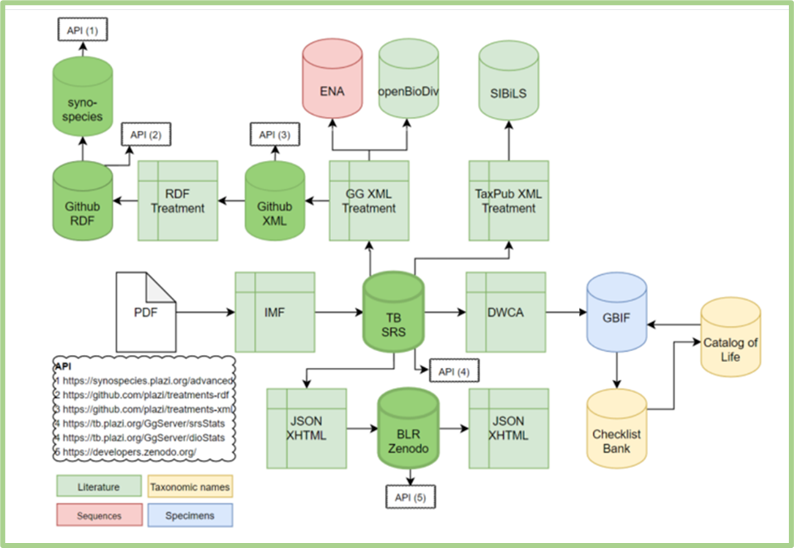
BKH offers a variety of services and tools covering the full workflow of biodiversity data. Users can utilize integrated BKH services to provide, facilitate, support, and scale up open access to FAIR interlinked data—liberated from literature, natural history collections, sequence archives, and taxonomic nomenclature in both human-readable and machine-actionable formats.
Figure 1. The full workflow of biodiversity data supported by BKH Services.
Specimen Data (GBIF)
Upload
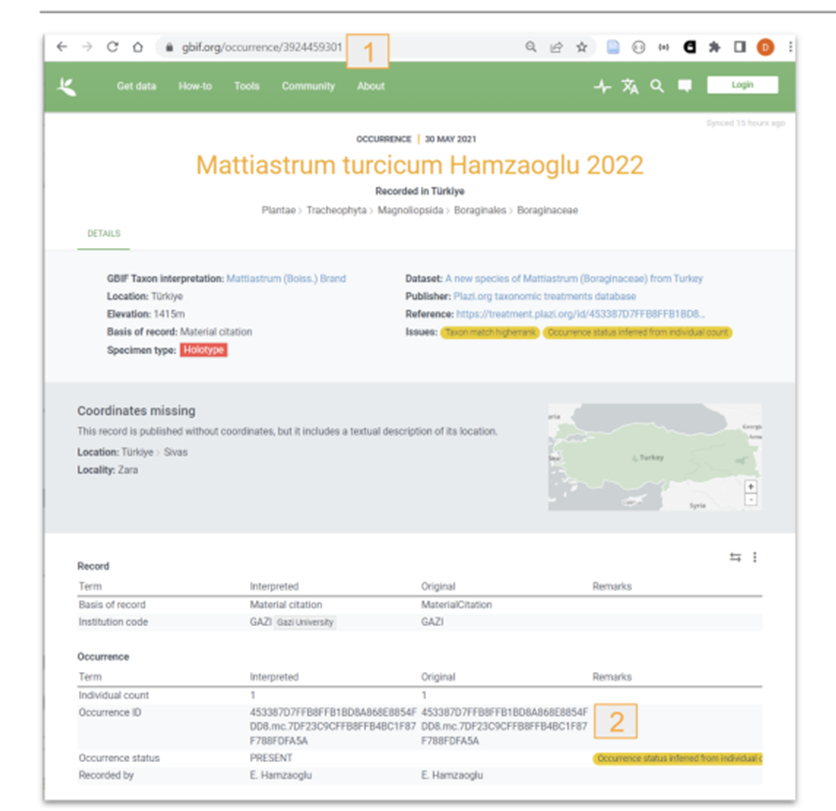
GBIF / ChecklistBank: A Darwin Core Archive (DwC-A) is packed, and the GBIF API is notified. GBIF then downloads and ingests the DwC-A into both the specimen handling systems (GBIF.org) and the taxonomic databases (Checklistbank.org).
Figure 2: Material citations re-used by GBIF. 1: GBIF occurrence key; 2: Imported TreatmentBank occurrence ID.
Import of Identifiers
The GBIF API returns a dataset key when a new dataset is registered, which TreatmentBank stores in the source publication. After (re-)exporting a DwC-A and notifying GBIF, a 15-minute timer triggers TreatmentBank to fetch records via the dataset key, extract individual taxon and occurrence keys, and link them to the treatment taxa and material citations. If not found, the timer resets to retry in 15 minutes.
Figure 3: Bidirectional links between TreatmentBank (Materials Citation UUID) and GBIF material citation (GBIF Occurrence ID).
Taxonomic Names (Catalogue of Life)
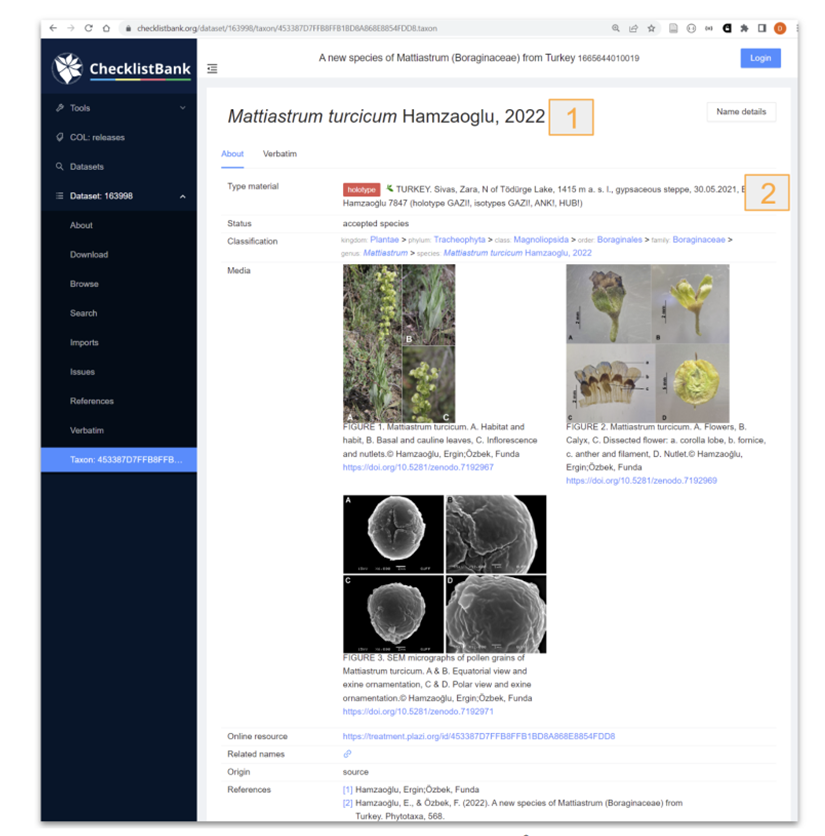
Provides bidirectional linking for new taxon names using a timer-based system (checking for new identifiers 6–12 hours post-export to GBIF via DwC-A). For existing taxon names, identifiers from the Catalogue of Life are imported during the initial treatment extraction process.
Figure 4. Data submitted and reused from ChecklistBank (1: taxonomic name, 2: Material citation). The taxonID in ChecklistBank matches the one generated by TreatmentBank.
DNA Sequence Data (ENA)
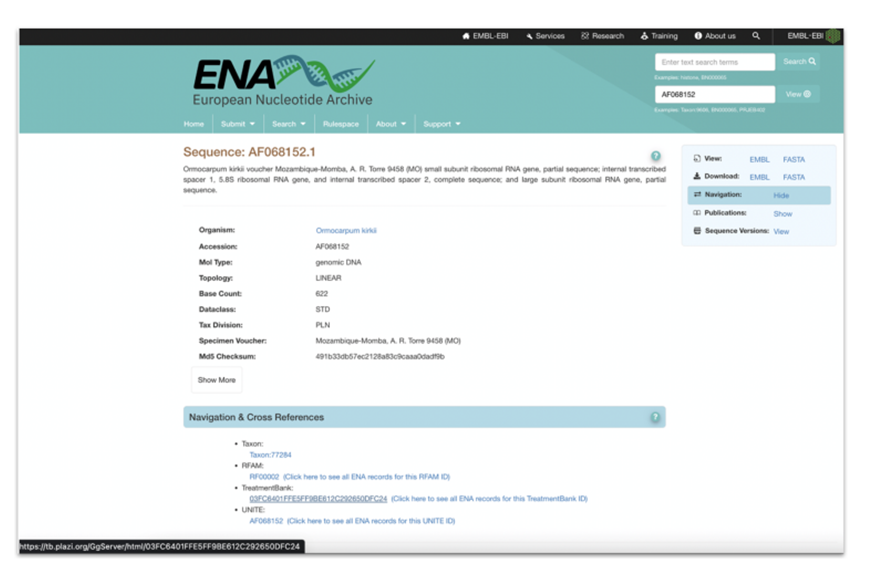
During markup, TreatmentBank queries ChecklistBank to retrieve Catalogue of Life taxon identifiers and associated NCBI/ENA backbone IDs. Annotated accession numbers are assigned HTTP URIs linking directly to the corresponding ENA gene sequence page without requiring further external lookups.
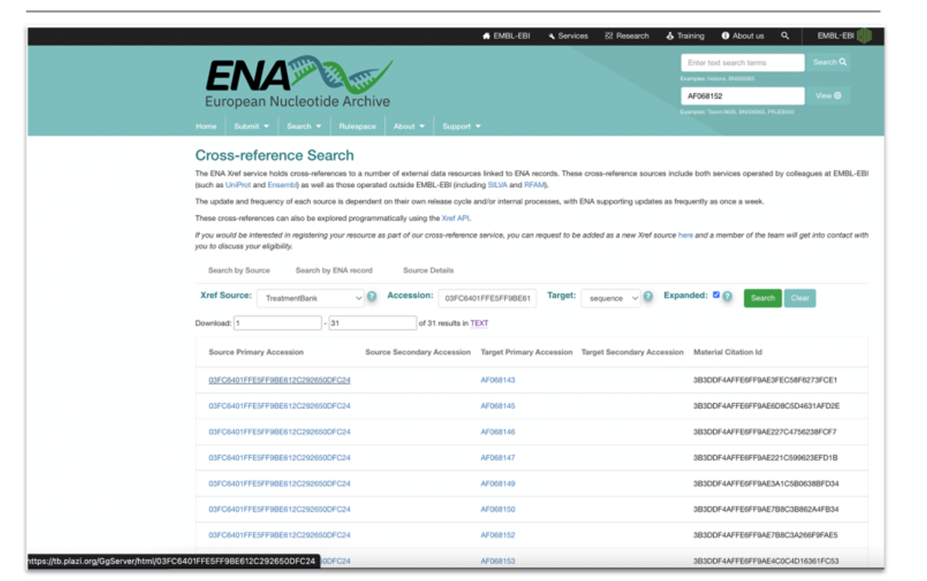
Figure 5: ENA Mockup display of cross reference to TreatmentBank.Figure 6: Mockup of Cross-reference Search for accession numbers in publications via TreatmentBank. Links connect to treatments (Source Primary Accession) and material citations (Material Citation ID).
Linked Open Data (OpenBioDiv)
When new treatments are created or modified in TreatmentBank, they are registered and queued in OpenBioDiv. OpenBioDiv fetches the generic GG XML format via HTTP URI (refer to Transfer Formats) and ingests it into its knowledge base.
Treatment TaxPub (SIBiLS)
New or modified treatments are converted into TaxPub via XSLT, validated, and transferred to SIBiLS via SFTP. Bidirectional linking will be enabled with the launch of the SIBiLS GUI.
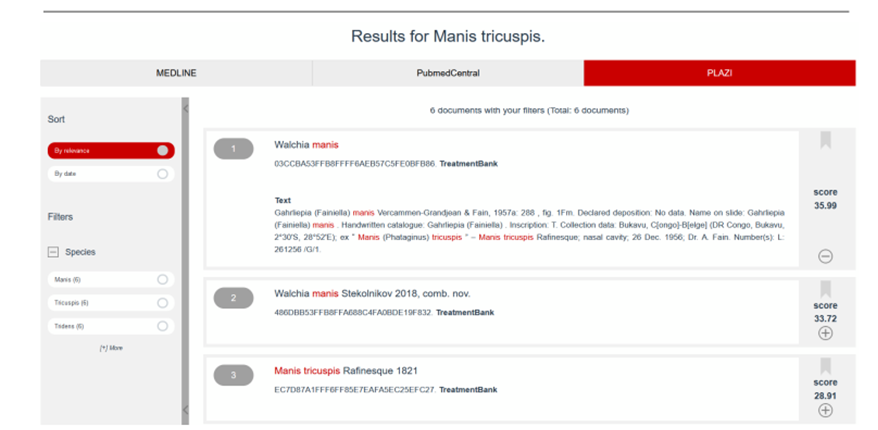
Figure 7: Display of Plazi contents in SIBiLS. The Plazi unique TreatmentBank identifier acts as a hyperlink back to Plazi.
Linked Open Data (Synospecies)
Treatments are bundled and pushed to a dedicated GitHub repository. A GitHub workflow transforms the GG XML into RDF XML and Turtle formats, which are then ingested into Synospecies.
XHTML (BLR / Zenodo)
Treatments are transformed into XHTML via XSLT, validated, and pushed to Zenodo via API alongside metadata generated in JSON. Returned deposition numbers and DOIs are saved back to TreatmentBank. Source PDFs and individual figures (as PNGs) are also exported to Zenodo to obtain unique DOIs, establishing explicit links between treatments and embedded figures.