Biodiversity Dynamics - Guideline on preparing data for simulations with the Grassmind Model
Section outline
-
The GRASSMIND model is a process‐based simulation model for temperate managed grasslands which represents a grassland plot by each single plant (in interaction with other plants). The model is designed as an individual‐based model (means: it simulates the dynamics of each single plant) and implemented in a modular way (means: each step of dynamic processes in grasslands is computed separately and allows for modification or extension).
Below you can find a brief summary of the functionalities that GRASSMIND can currently account for in simulations.
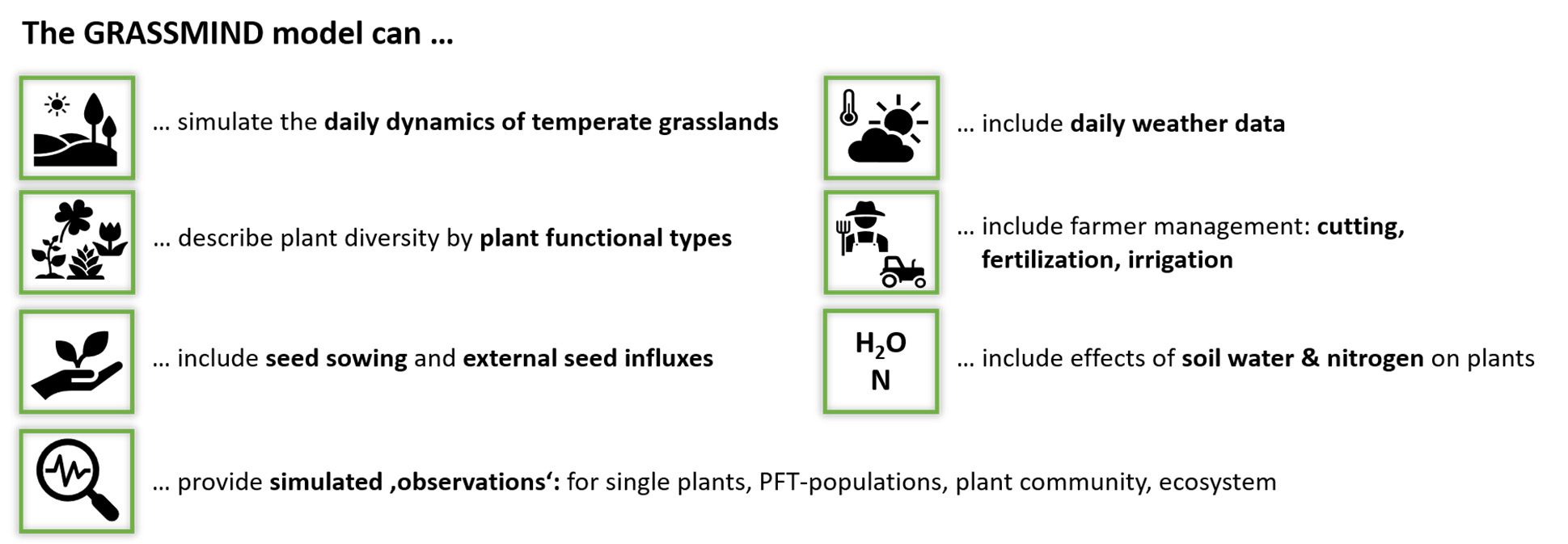
An important concept of GRASSMIND is the simulation of plant functional types (PFT) instead of single plant species. For an adequate comparison of simulations and observations as well as interpretation of simulation results, plant species occurring at a considered grassland site should be assigned to one of the following PFT:

(1Small and tall herbs are differentiated by the maximum height, here 60 cm.)
The GRASSMIND model is currently still at a development and testing stage and has previously been tested for various grassland field sites in Germany.
When testing the GRASSMIND model for new sites or under changing conditions, we do not expect that the model simulations will perfectly match your observations. However, we do hope that the combination of your expertise and field observations with process‐based modelling will improve the accuracy, predictive capacity and applicability of the model. We therefore highly welcome feedback on potential extensions or modifications that could facilitate relevant applications.
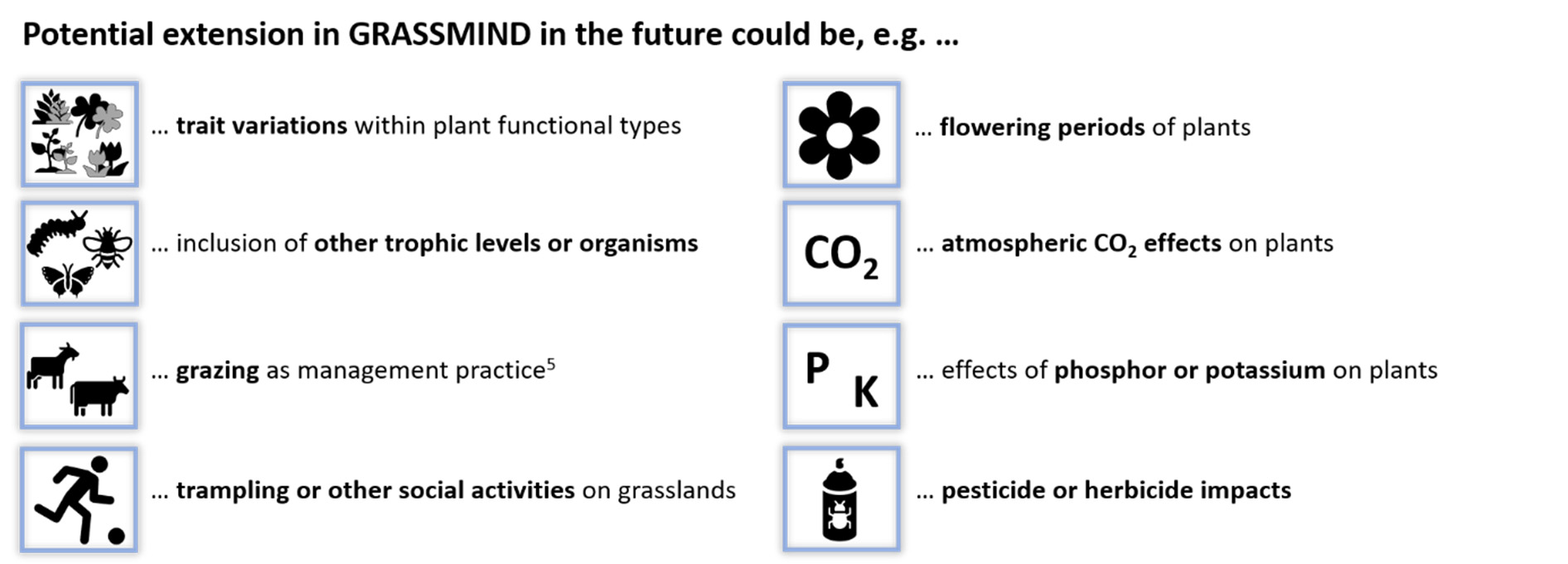
(5A modelling approach of grazing as management practice is currently being implemented in GRASSMIND and will be tested soon.)
-
As basic information, details on your site and plot(s) location would be required as follows:
- DEIMS.iD
- Longitude and latitude of plot(s)
- Basic information of management actions (mowing, fertilization, grazing, irrigation) per plot

Further, observation data from your site are required to compare model simulations with your measurements. Optionally, also environmental variables that were measured can be included to run GRASSMIND simulations with the site-specific environmental conditions.
Minimum data
Based on latitude and longitude of the plot(s), the required input files for your specific site to run GRASSMIND simulations will be automatically created (using open-source weather data and remote sensing maps). The minimum data (see table below) will then be used to compare the respective simulations of GRASSMIND with your observations.
Plant species composition

What exactly to provide?
- relative abundances (based on number of plants, biomass, cover, or other)
- at minimum one date (ideally, several dates)
- for each plant functional type (PFTs, see section 1)6
Used for comparison of the simulation output with observations on your field site (via summary statistics, goodness-of-fit measures, visualizations)
Optional data
If available, the following detailed data (see table below) can be used to prepare all GRASSMIND input files using predefined templates and formats.
Weather data

What exactly to provide?
- precipitation
- air temperature
- photosynthetic photon flux density
- potential evapotranspiration
Extent/resolution: daily resolution for the entire envisaged simulation period
Used as input for model simulations (plant photosynthesis and soil water dynamics)
Management data

What exactly to provide?
- each date and cutting height of mowing events
- each date and fertilizer amount of fertilization events
- each date and water amount of irrigation events
Extent/resolution: day-specific for all management events within the simulation period
Used as input for model simulations (management activities)
Soil data

What exactly to provide?
- soil texture (fractions of sand, silt, clay content)
- field capacity (V%)
- permanent wilting point (V%)
- porosity (V%)
- saturated hydraulic conductivity (V%)
Extent/resolution: per 10 cm soil layer for a soil depth of 2 m (no temporal changes)
Used as input for model simulations (dynamics of soil carbon, nitrogen and water)
Observation data

What exactly to provide?
- Aboveground biomass in total and/or per PFT
- Vegetation cover in total and/or per PFT
- Yield
- Leaf area index
- Any other measurements (e.g. plant heights, number of plants)
Extent/resolution:
- at minimum one date (ideally, several dates)
- for each of the four PFT6
(6Please contact us if you need support in assigning your recorded plant species to the four PFTs)
Used for comparison of various simulation outputs with observations on your field site
Any additional information is beneficial and can help to improve simulation results for your site and the accuracy of model predictions. These could be, for example:
I. Site history
- If sown experiment: amount of seeds sown for each PFT or species, sowing dates, any information on pre‐treatments of the plot
- If established grassland: any information on the history of the plot
II. Missing or site‐specific aspects
- Aspects so far not yet modelled or included in GRASSMIND. This could account for treatments like weeding or CO2 fertilization, or for site‐specific attributes like slopes of alpine grasslands.
- DEIMS.iD
-
In the following section, the file formats of relevant input files for GRASSMIND as well as the format of (required and possible additional) observation data from your grassland site are described.
3.1 Basic information
Basic information on your site and the respective plot(s) should be provided in a TXT‐file (tab-separated) with the following format and specifications:
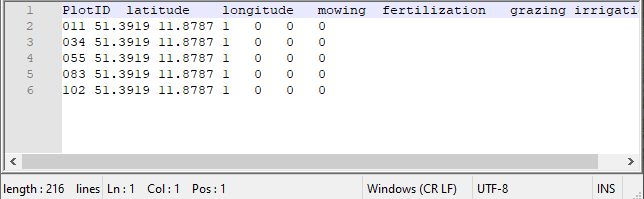
File Format: TXT
File name: DEIMS.iD_PlotInfo.txt,
e.g. 102ae489‐04e3‐481d‐97df‐45905837dc1a_PlotInfo.txt
Separator: \t (tab)
Decimal representation: . (dot)
Header: PlotID latitude longitude mowing fertilization grazing irrigation
Lines: each row below the header represents the basic information of each plot included for your specific site
Columns: the following columns should include plot‐specific information on
- PlotID = a unique identifier to differentiate the plots included for your site
- latitude = geographical latitude of the plot (decimal unit)
- longitude = geographical longitude of the plot (decimal unit)
- mowing = value of either 0 (no mowing) or 1 (mowing) as management action
- fertilization = value of either 0 (no fertilization) or 1 (fertilization) as management action
- grazing = value of either 0 (no grazing) or 1 (grazing) as management action
- irrigation = value of either 0 (no irrigation) or 1 (irrigation) as management action

Please use the DEIMS.iD of your site (cf. https://deims.org/) in the filename (cf. example above).
3.2 Weather data
Weather data are required as a TXT‐file (tab‐separated) with the following format and specifications:
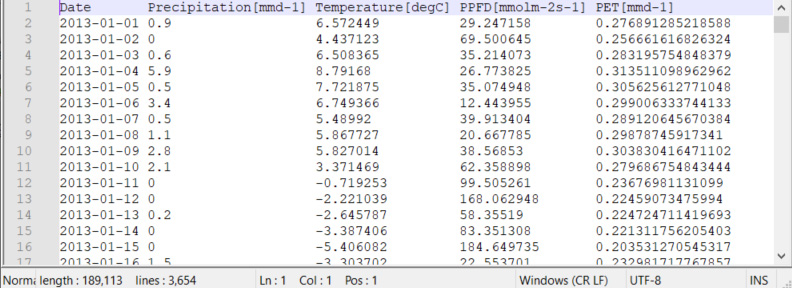
File format: TXT
File name: DEIMS.iD_PlotID_Weather.txt
Separator: \t (tab)
Decimal representation: . (dot)
Header: Date Precipitation[mmd-1] Temperature[degC] PPFD[mmolm-2s-1] PET[mmd-1]
Lines: each row below the header represents the weather data of 1 day of model simulation
- first line below the header = 1st day of the envisaged simulation period
- last line in the file = last day of the envisaged simulation period
- leap years are included
Columns: weather variables include the following columns
- Date = date of observed weather variables (format: yyyy‐mm‐dd)
- Precipitation = daily sum of rainfall (unit: mm per day)
- Temperature = daily mean air temperature (unit: C°), e.g. measured at about 1 m height
- PPFD = daily mean photosynthetic photon flux density (unit: μmolphoton per m² per s)
- PET = potential evapotranspiration (unit: mm per day)

Calculations of the daily mean or sum of weather variables consider the full day of 24 hours.
 You can contact us for support on PET calculation from other weather variables or for unit conversion to PPFD.
3.3 Soil data
Soil data are required as a TXT‐file (tab‐separated) with the following format and specifications:
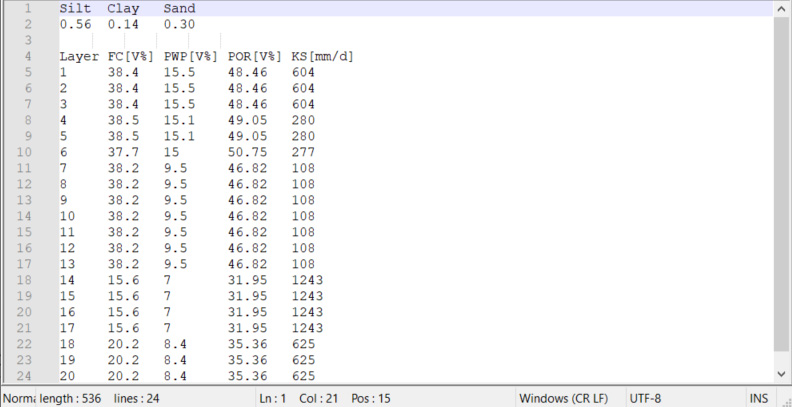
File format: TXT
File name: DEIMS.iD_PlotID_Soil.txt
Separator: \t (tab)
Decimal representation: . (dot)
Header: 1st line: Silt Clay Sand
4th line: Layer FC[V%] PWP[V%] POR[V%] KS[mm/d]
Lines: each row provides static soil properties in total (2nd line) or for each soil layer (5th – 24th lines)
- 2nd line: fractions of silt, clay and sand (should sum to 1)
- 5th – 24th line: properties for the respective soil layers of 10 cm depth, starting from the top (0‐10 cm, 5th line) to the bottom soil layer (190 – 200 cm, 24th line)
Columns: soil variables include the following columns
- Layer = soil layer number (numbered from top to bottom), in total 20 layers each 10 cm deep (all following variables given for each layer)
- FC = field capacity (unit: V% of the soil volume)
- PWP = permanent wilting point (unit: V% of the soil volume)
- POR = soil porosity, i.e. pore volume (unit: V% of the soil volume)
- KS = saturated hydraulic conductivity (unit: mm per day)
Note that soil texture refers to the entire soil volume of 2 m depth and fractions of sand, silt and clay should sum up to one. All other properties are required for each soil layer. If this information is not available per soil layer but for the total soil volume, the same values can be entered for each soil layer.You can contact us for support on estimations of soil properties based on soil texture for specific soil layers.3.4 Management data
Management information is required as a TXT‐file (tab‐separated) with the following format and specifications:
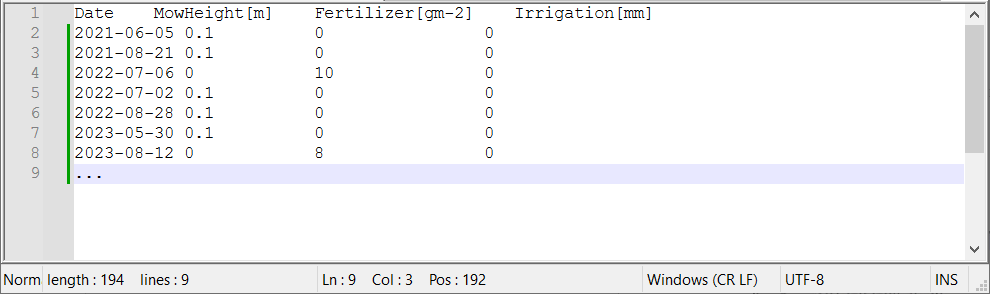
File format: TXT
File name: DEIMS.iD_PlotID_Management.txt
Separator: \t (tab)
Decimal representation: . (dot)
Header: Date MowHeight[m] Fertilizer[gm-2] Irrigation[mm]
Lines: each row below the header represents one day‐specific event of a respective management action (in temporal order of occurrence within the simulation period)
Columns: management variables include the following columns
Date = date of the respective management action (format: yyyy‐mm‐dd)
MowHeight = height to which the grassland is cut down (unit: m) (> 0 if mowing is done, = 0 for no mowing on this day)
Fertilizer = added amount of nitrogen to the topsoil layer (unit: g/m²) (> 0 if fertilization is done, = 0 for no fertilization on this day)
Irrigation = added water to the topsoil layer (unit: mm) (> 0 if irrigation is done, = 0 for no irrigation on this day)
You may either use separate lines if more than one management action on the same day are planned (e.g. on 2015‐06‐22 in the screenshot above) or also combine several management actions on the same day in one line.3.5 Grassland observation data
In the following subsections, different characteristics of grasslands are described that may have been measured. For your site, please go to the respective subsection for instructions on how to prepare the data files for comparison with model simulation results:
- Plant species composition (*required): subsection 3.5.1
- Vegetation cover: subsection 3.5.2
- Aboveground biomass: subsection 3.5.3
- Yield: subsection 3.5.4
- Leaf area index: subsection 3.5.5
- Any other measure: subsection 3.5.6
3.5.1 Plant species composition
Plant species composition should be provided as relative abundances of each PFT for at minimum one date (ideally, several dates). The data file should be provided as a TXT‐file (tab‐separated) with the following format and specifications:
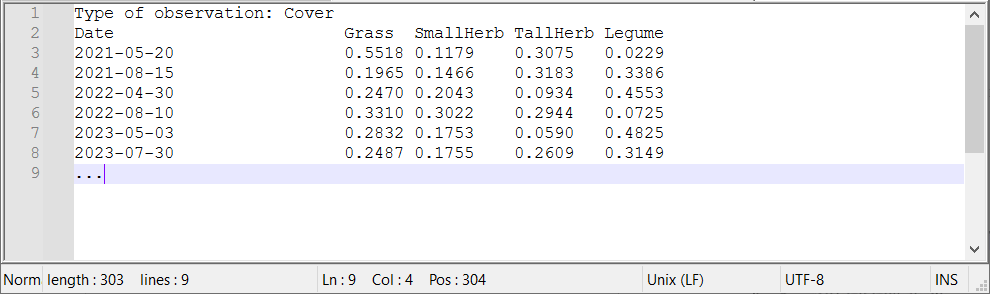
File format: TXT
File name: DEIMS.iD_PlotID_RelativeAbundance.txt
Separator: \t (tab)
Decimal representation: . (dot)
Header: 1st line: Type of observation:
2nd line: Date Grass SmallHerb TallHerb Legumes
Lines: each row below the header represents one day‐specific event of a measurements in the field referring to the observations (in a temporal order of its occurrence within the simulation period).
Columns:
- Date = date of the respective measurement (format: yyyy‐mm‐dd)
- Grass = relative abundance of all plant species assigned to PFT Grasses (unit: ‐)
- SmallHerb = relative abundance of all plant species assigned to PFT SmallHerbs (unit: ‐)
- TallHerb = relative abundance of all plant species assigned to PFT TallHerbs (unit: ‐)
- Legume = relative abundance of all plant species assigned to PFT Legumes (unit: ‐)
If relative abundances are recorded for each plant species, we can support you in grouping them into plant functional types (PFTs) based on their scientific Latin names. Relative abundance can be calculated based on different measurements (e.g. number of plants, biomass, cover, or other), so please also provide this information to us in order to do a correct comparison with the model simulations (type after colon in first header line Type of observation).
In the example above, we used the vegetation cover as observation type for the calculation of relative abundance of each PFT as follows:

Note that relative abundances of the four PFTs per observation date should sum up to 1. Missing values should be set to NaN.3.5.2 Vegetation cover
Information can be provided as a TXT‐file (tab‐separated) with the following format and specifications:
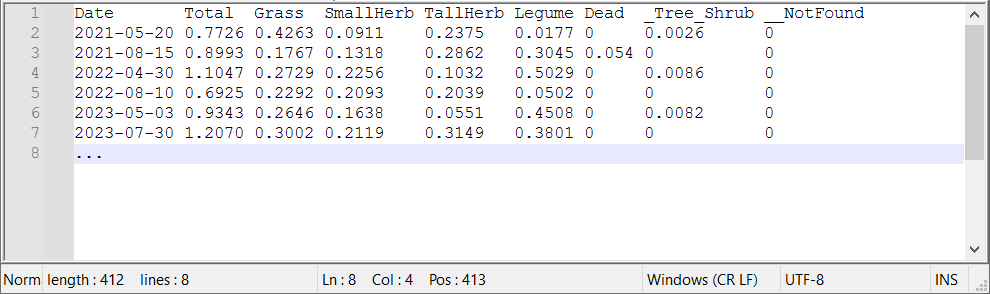
File format: TXT
File name: DEIMS.iD_PlotID_Cover.txt
Separator: \t (tab)
Decimal representation: . (dot)
Header: Date Total Grass SmallHerb TallHerb Legume Dead _Tree_Shrub __NotFound
Lines: each row below the header represents one day of the respective observation (in temporal order of occurrence within the simulation period)
Columns: observation variables include the following columns
- Date = date of the respective observation (format: yyyy‐mm‐dd)
- Total = cover of vegetation (unit: ‐)
- Grass = cover of vegetation assigned to PFT Grasses only (unit: ‐)
- SmallHerb = cover of vegetation assigned to PFT SmallHerbs only (unit: ‐)
- TallHerb = cover of vegetation assigned to PFT TallHerbs only (unit: ‐)
- Legume = cover of vegetation assigned to PFT Legumes only (unit: ‐)
- Dead = cover of dead vegetation (irrespective of PFTs) (unit: ‐)
- _Tree_Shrub = cover of any woody vegetation (e.g. trees or shrubs) (unit: ‐)
- __NotFound = cover of any non‐woody vegetation that could not be assigned to the respective four PFTs (e.g. mosses) (unit: ‐)
Note that the Total cover need not equal the sum of cover of the four PFTs per observation date as they may have been measured independently. All values for cover should relate to the ground area considered. If you have measured only parts of the variables, please add NaN for those not measured. Missing values should also be set to NaN.The measurements of Grass, SmallHerb, TallHerb and Legume can be used for deriving the relative abundances of PFTs (see subsection 3.5.1 on plant species composition; Type of observation: Cover).3.5.3 Aboveground biomass
Information can be provided as a TXT‐file (tab‐separated) with the following format and specifications:
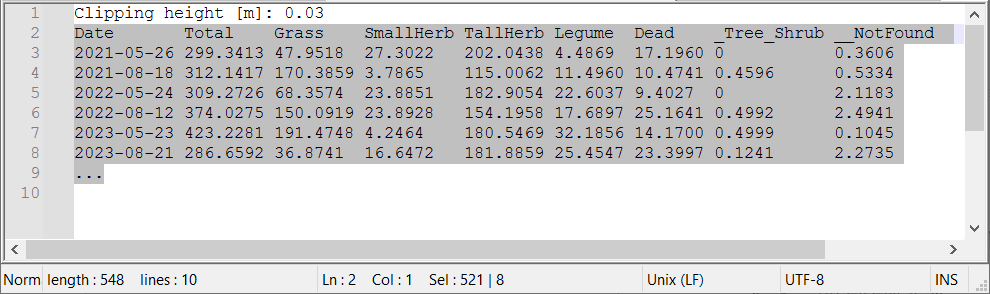
File format: TXT
File name: DEIMS.iD_PlotID_Biomass.txt
Separator: \t (tab)
Decimal representation: . (dot)
Header: 1st line: Clipping height [cm]
2nd line: Date Total Grass SmallHerb TallHerb Legume Dead _Tree_Shrub __NotFound
Lines: each row below the header represents one day of the respective observation (in temporal order of occurrence within the simulation period)
Columns: observation variables include the following columns
- Date = date of the respective observation (format: yyyy‐mm‐dd)
- Total = total aboveground biomass of vegetation (unit: gODM per m²)
- Grass = aboveground biomass of vegetation assigned to PFT Grasses only (unit: gODM per m²)
- SmallHerb = aboveground biomass of vegetation assigned to PFT SmallHerbs only (unit: gODM per m²)
- TallHerb = aboveground biomass of vegetation assigned to PFT TallHerbs only (unit: gODM per m²)
- Legume = aboveground biomass of vegetation assigned to PFT Legumes only (unit: gODM per m²)
- Dead = aboveground biomass of dead vegetation (irrespective of PFTs) (unit: gODM per m²)
- _Tree_Shrub = aboveground biomass of any woody vegetation (e.g. trees or shrubs) (unit: gODM per m²)
- __NotFound = aboveground biomass of any non‐woody vegetation that could not be assigned to the respective four PFTs (e.g. mosses) (unit: gODM per m²)
Note that the sum of aboveground biomass of the four PFTs and the Dead biomass per observation date should equal the Total aboveground biomass. If present, additional biomass from species assigned to _Tree_Shrub or __NotFound should NOT be included in the Total aboveground biomass. Please also add the information at which height biomass was clipped for measurements (add after colon in first header line Clipping height). If you have measured only parts of the variables, please add NaN for those not measured. Missing values should also be set to NaN.The measurements of Grass, SmallHerb, TallHerb and Legume can be used for deriving the relative abundances of PFTs (see subsection 3.5.1 on plant species composition; Type of observation: Biomass).3.5.4 Yield
Information can be provided as a TXT‐file (tab‐separated) with the following format and specifications:
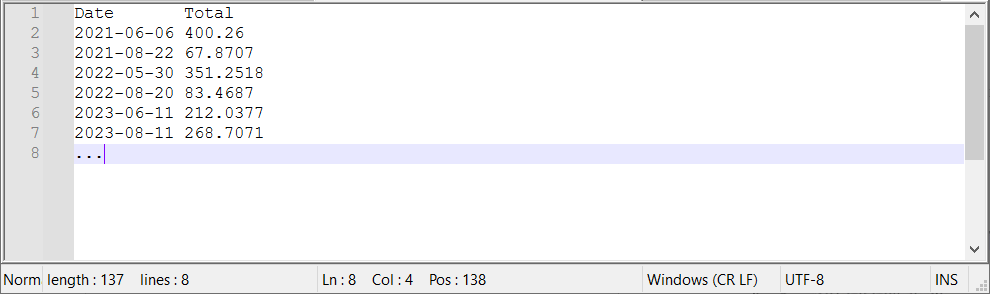
File format: TXT
File name: DEIMS.iD_PlotID_Yield.txt
Separator: \t (tab)
Decimal representation: . (dot)
Header: Date Total
Lines: each row below the header represents one day of the respective observation (in temporal order of occurrence within the simulation period)
Columns: observation variables include the following columns
- Date = date of the respective observation (format: yyyy‐mm‐dd)
- Total = total yield (or mown aboveground biomass) of vegetation (unit: gODM per m²)
Note that yield (or mown aboveground biomass) refers to the cutting height defined in the management file (section 3.4). Missing values should be set to NaN.3.5.5 Leaf area index
Information can be provided as a TXT‐file (tab‐separated) with the following format and specifications:
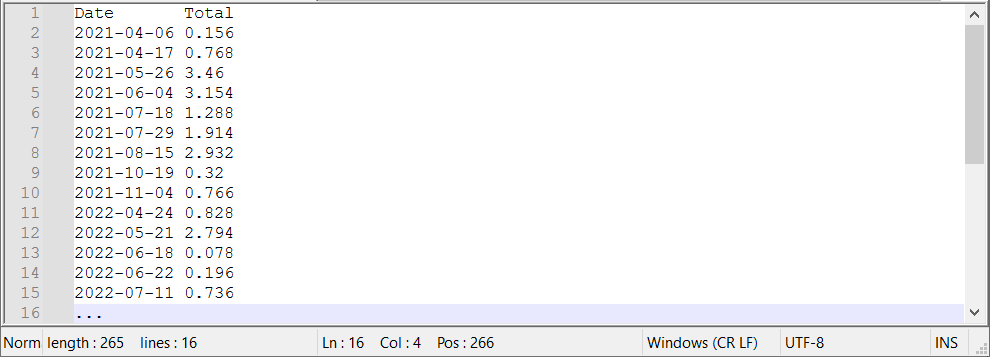
File format: TXT
File name: DEIMS.iD_PlotID_LAI.txt
Separator: \t (tab)
Decimal representation: . (dot)
Header: Date Total
Lines: each row below the header represents one day of the respective observation (in temporal order of occurrence within the simulation period)
Columns: observation variables include the following columns
- Date = date of the respective observation (format: yyyy‐mm‐dd)
- Total = leaf area index of vegetation (unit: m² per m²)
Missing values should be set to NaN.3.5.6 Any other observations of grassland vegetation
Additional measurements might encompass the number of plants (individuals), vegetation height or any other observation not listed above. If you would like to add such information for the comparison of model simulations with your data, please contact us. You may also prepare already own TXT‐files (tab‐separated) with a file structure comparable to the files described above (with one TXT‐file for each additional type of observation).
3.5.7 Additional plot or site information
Please add any additional information on specific characteristics, treatments or history of your site or plots into a plain TXT‐file. This could be, for example, details on whether the plot has been sown at a specific date, weeded, or fertilized with CO2, or any site‐specific characteristics that might influence plant growth (located on a slope, located nearby agricultural fields sprayed with pesticides, …).
3.6 Examples and templates
You can find exemplary TXT‐files (of the above presented screenshots) as well as templates for preparing your own data in the cloud folder, which link and password will be made available upon request. - PlotID = a unique identifier to differentiate the plots included for your site
-
Please zip the prepared files of your own data (including the DEIMS.iD also in the zip-file name) and get ready to upload it to the cloud folder.
Cloud link and password will be made available upon request.
-
In order to get support, please contact the developer team via mail.
 Franziska.taubert@ufz.de (https://www.ufz.de/index.php?en=36648)
Thomas.banitz@ufz.de (https://www.ufz.de/index.php?de=36586)
More information (model description, exemplary simulation studies and open source code) can be downloaded at: https://www.ufz.de/index.php?en=48444)
Please note, as GRASSMIND is currently in a development stage, the source code, model description and exemplary simulation projects get updated regularly. If downloaded once, you will get notified by mail every time a new update is available. -
Hetzer, J., Huth, A., Taubert, F., (2021): The importance of plant trait variability in grasslands: a modelling study. Ecol. Model. 453 , art. 109606.
Schmid, J.S., Huth, A., Taubert, F., (2021): Influences of traits and processes on productivity and functional composition in grasslands: A modeling study. Ecol. Model. 440 , art. 109395.
Taubert, F., Hetzer, J., Schmid, J.S., Huth, A., (2020): Confronting an individual‐based simulation model with empirical community patterns of grasslands. PLOS One 15 (7), e0236546.
Taubert, F., Banitz, T., Wohner, C., (2023): Guideline on how to provide data from a grassland site for simulations with the GRASSMIND model. https://zenodo.org/records/10125790.
Banitz, T., Taubert, F., (2023): Grassland Biodiversity Dynamics. https://zenodo.org/records/8100303.