WoRMS Taxon Match Tool
Section outline
-
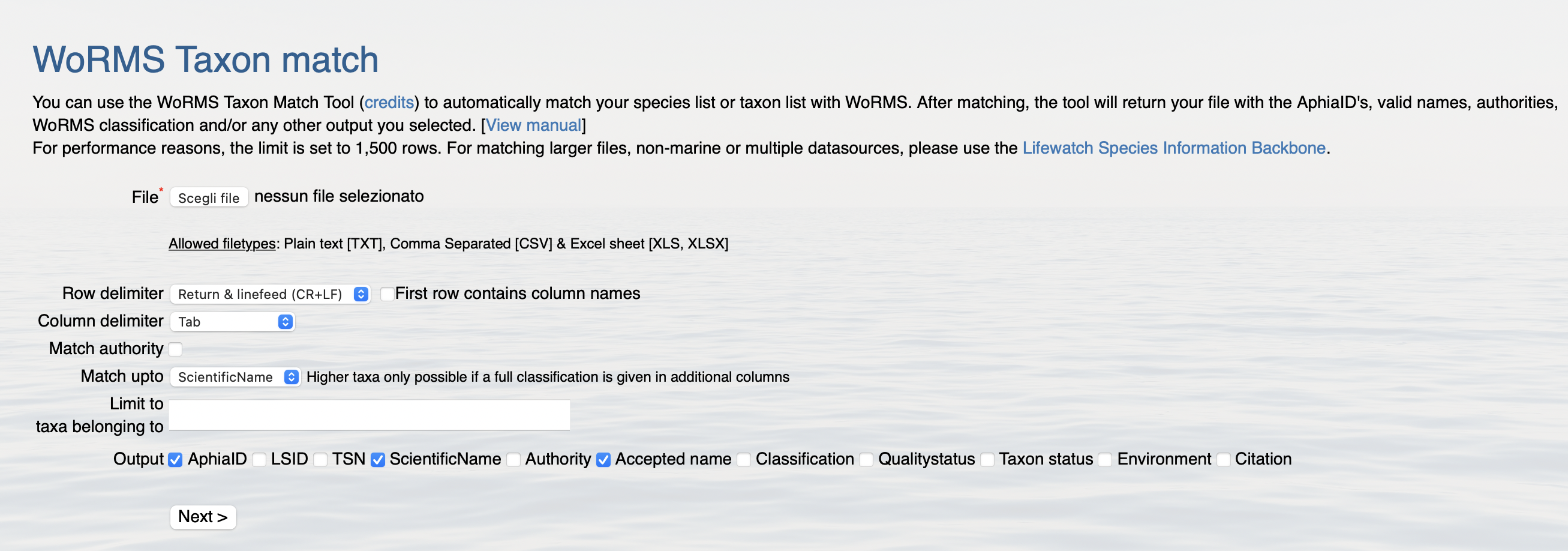
The WoRMS Taxon Match Tool enables you to automatically match your species list or taxon list with WoRMS. After matching, the tool will return your file with the AphiaID's, valid names, authorities, WoRMS classification and/or any other output you selected.
For performance reasons, the limit for the tool is set to 1,500 rows.
If you want to match larger, non-marine or multiple datasources, you can use the LifeWatch E-Lab! Check it out in the section below.
-
To successfully match your data you must follow these 7 steps:
- Prepare your Species list
- Upload your File
- Select how you delimited your Taxon names
- Match authority
- Match up to
- Indicate which data the system must return
- Choose types of matches
-
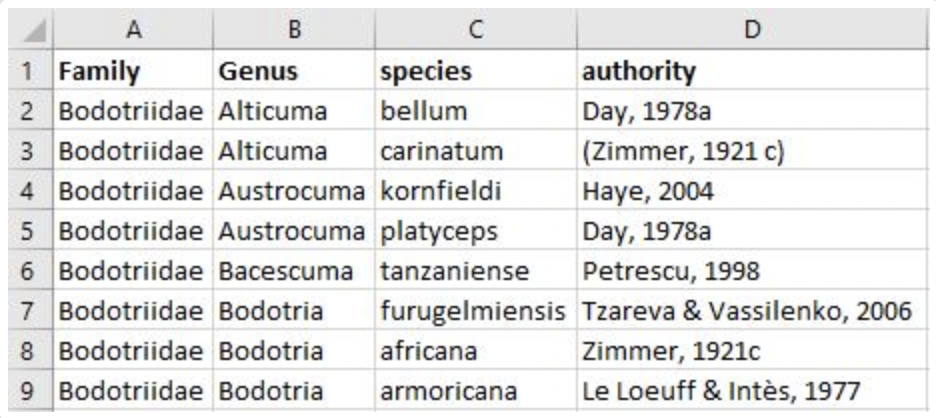
Prepare your species list before matching. For example create columns for each taxon rank (incl. sub, super and infra ranks) and list the species in rows. Remove additional information that is not part of the species name, e.g. erase all notations of sp., cfr., larvae, indet., etc.. The species list can be an excel sheet (example below), plain text or csv file.
-
Click on "choose file" to upload your file. This will open the file explorer on your PC.

-
Select the way you have delimited your taxon names. When you use an MS Excel sheet, this is selected automatically. Use the flag box to indicate whether your first row contains the column names or not.

-
Use the flag box "Match authority" when you have the authority (=author(s), date) in a separate column and you want to include this as a criterium to find exact matches.

-
With the "Match up to" drop-down list you can define to what level in the classification you want to match your list with. For example if your taxon list includes columns for higher ranks such as Class, Order, Family, Genus etc. you can include these in the match query. In this way you can verify your own classification.
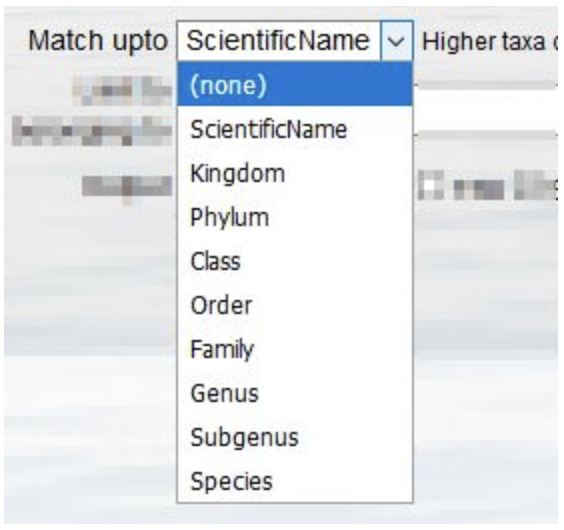
If you only have one column with taxon names, so no classification, then you indicate match up to "ScientificName".
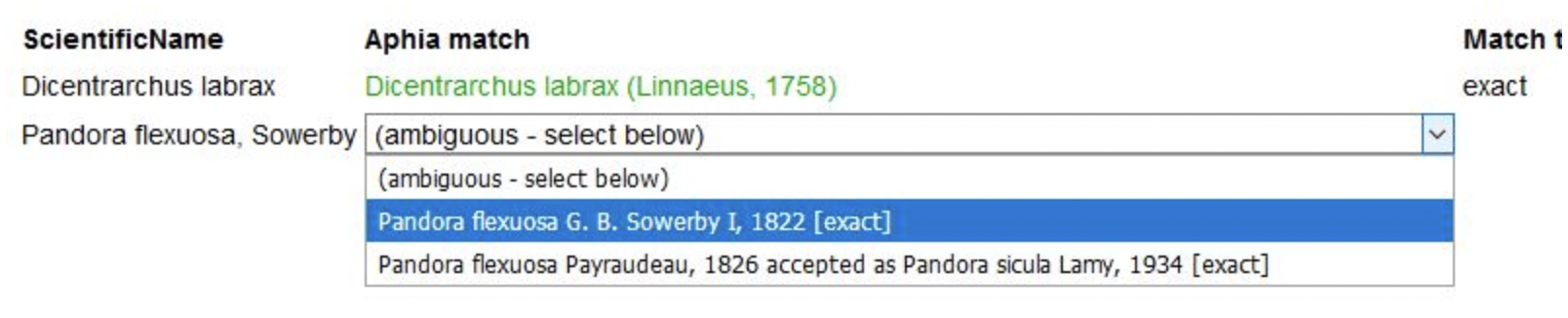
When the taxon name has a homonym, you will be able to choose the right one from a pick list. To avoid ambiguous matches with homonyms in the first place, you can limit your match query to a particular higher taxon, e.g. only within Porifera, Copepoda, etc.. Enter the first characters of the taxon name and use the pick-list.

-
Finally, before you click on "Next" also indicate in the output boxes which data you would like the system to return. AphiaID is the unique identifier of WoRMS; TSN is the unique identifier of ITIS; the valid names option lists the valid names in a separate column (this is important when your list includes unaccepted names or spelling variations). You can also ask to receive the full classification, authority and quality status flags. The output format is in txt, xls or SGML.

When you click on "Match" you will get the following window, were you can fix possible homonyms.
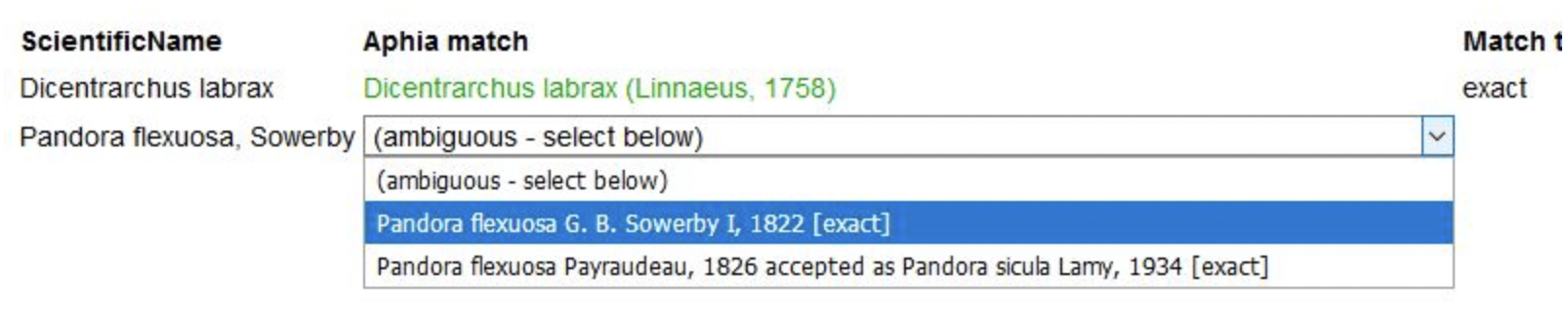
You can choose what the output format of your file will be (for example XLSX) and then click on "Download"


-
There are several types of matches:
- exact: all characters match exactly
- exact_subgenus: an exact match, but including the subgenus
- phonetic: sounds similar as, despite minor differences in spelling (soundex algorithm)
- near_1: perfect match, except for one character. This is a quite reliable match
- near_2: good match, except for two characters. This needs an extra check
- near_3: good match, except for three characters. This definitely needs an extra check
- match_quarantine: match with a name that is currently in quarantine. Any name that has been used in the literature should in principle not be quarantined. [Best to contact the WoRMS DMT about this]
- match_deleted: this is a match with a name that has been deleted and no alternative is available. [Please contact the WoRMS DMT when you come across this.]
-
The World Register of Marine Species (WoRMS) aims at providing an authoritative and comprehensive list of names of marine organisms, including information on synonymy. While the highest priority goes to valid names, other names in use are included so that this register can serve as a guide to interpret taxonomic literature.
This register of marine species grew out of the European Register of Marine Species (ERMS), and its combination with several other species registers maintained at the Flanders Marine Institute (VLIZ). Rather than building separate registers for all projects, and to make sure taxonomy used in these different projects is consistent, VLIZ developed a consolidated database called ‘Aphia’. Aphia contains valid species names, synonyms and vernacular names, and extra information such as literature and biogeographic data. Besides species names, Aphia also contains the higher classification in which each scientific name is linked to its parent taxon. The classification used is a ‘compromise’ between established systems and recent changes. Its aim is to aid data management, rather than suggest any taxonomic or phylogenetic opinion on species relationships. MarineSpecies.org is the web interface for the marine taxa available in this Aphia database.
WoRMS combines information from Aphia with other authoritative marine species lists which are maintained by others (e.g. AlgaeBase, FishBase), the so-called 'externally hosted and managed species databases'.
This register, which is hosted by VLIZ, a member of LifeWatch Belgium, has received endorsement by the Ocean Decade as a ‘Project Action’. In early October 2021, the UN Decade of Ocean Science for Sustainable Development (‘Ocean Decade’), endorsed 94 new Decade Actions across all ocean basins, all of them contributing in some way to the central vision of “the science we need for the ocean we want”.
-
The E-Lab is one of the virtual laboratories developed by LifeWatch Belgium. This online application allows users to standardize, analyze and visualize their data, making use of web services built on top of internal and external reference databases.
A user can select several data services (taxonomic, geographic, thematic, etc.) and run them successively through a straightforward user interface.
The LifeWatch.be web services can be used in a concatenated way, where the output of one web service is the input for the next web service. Establishing such workflows helps solving (complicated) biological questions.
Check it out at the link below and refer to the E-lab user guide to learn how to use it.
-
This tool uses the following components:
TAXAMATCH fuzzy matching algorithm by Tony Rees
PHP/MySql port of TAXAMATCH by Michael Giddens
Scientific Names Parser by Dmitry Mozzherin
This resource was developed by LifeWatch Belgium.